

Your players join your Barotrauma server with its Server Address, shown on the server's Overview page in the panel. Barotrauma is a 2D co-op submarine survival game where a crew works together to run a sub, complete missions and survive sea monsters; a hosted server keeps a lobby and campaign online without anyone having to leave the game open.
Join in a few steps
- Open your server in the panel. If the status badge says Offline, click Start and wait until it says Online. See How to start, stop, restart and force-stop your server.
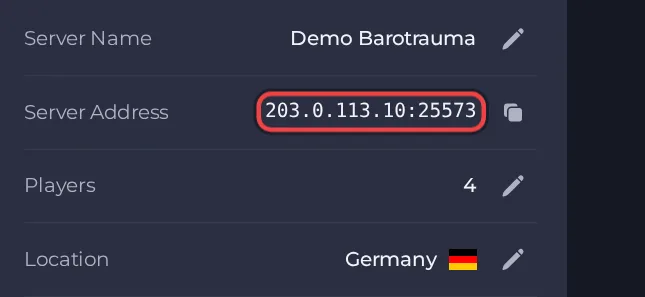
- On the Overview page, click the copy icon next to Server Address. It looks like
address:port.
- Launch Barotrauma on Steam and make sure it is fully updated.
- From the main menu open the multiplayer server browser.
- Type your player name in the name box first. The game will not let you join directly while that box is empty.
- Use the direct join option at the bottom of the server browser.
- Enter the Server Address from your Overview page exactly as shown, as address:port, and confirm.
- If the server has a join password, type it when the game asks. If the password is empty, no prompt appears.
Ports
Players use only the one address:port shown as the Server Address on the Overview page, entered with a colon between the address and the port. Nothing else needs to be typed.
Game version
The game version on the server must match the player's version in the first three numbers (major, minor and build). The last number is ignored. Players update through Steam, so a server on an older build turns them away. By default the server checks for a game update every time it starts, so restarting it brings it up to date. If Auto Update is turned off, the server stays on its current build and will lock out players once they update.
If you cannot join
- The server must be Online. Check the badge at the top of the page.
- Copy the address again from the panel. A missing or mistyped port is the most common cause.
- Make sure every player runs a compatible game version and the same mods.
- Check the password, if you set one. See How to set up your Barotrauma server.
- More checks: How to join your server and Barotrauma server problems and fixes.





