

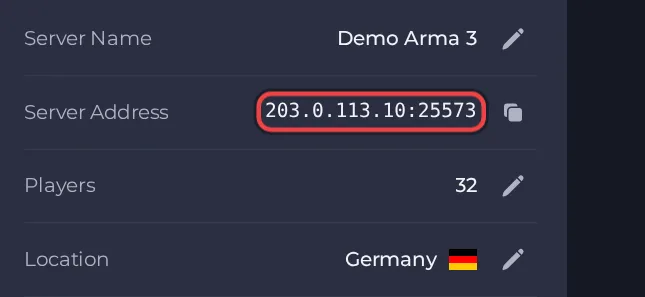
Your players join your Arma 3 server with its Server Address, shown on the server's Overview page in the panel. Arma 3 is a large military sandbox shooter with co-op and team-versus-team multiplayer, and a hosted dedicated server gives your group an always-on host for missions, mods and your own admin rules.
Join in a few steps
- Open your server in the panel. If the status badge says Offline, click Start and wait until it says Online. See How to start, stop, restart and force-stop your server.
- On the Overview page, click the copy icon next to Server Address. It looks like
address:port.
- Start Arma 3 from Steam. The Arma 3 Launcher opens first.
- If the server uses mods, open the Mods page in the Launcher and move exactly the mods the server uses into the Loaded mods list. If it is an unmodded server, make sure no mods are loaded.
- Open the BattlEye page and make sure Enable BattlEye anti-cheat software is ticked, because the server runs BattlEye by default.
- Open the Servers page and click Direct connect at the bottom, then type the server's address and its port. Alternatively, search for the server by name on the Internet tab and click JOIN when you hover over its row.
- If you set a Server Password, type it when asked.
- If no mission is running yet, wait in the lobby until an admin logs in and picks one.
Ports
Players join with the address and port shown on the server's Overview page (voice chat uses the same port). The game's other ports are worked out from it automatically and players never type them.
Game version
Stable and development branch clients cannot join each other's servers, so the client branch must match the server branch (the default is the public stable branch). With Automatic Updates ON, the server checks for game and mod updates every time it starts, so restart it after an Arma 3 update to bring it in line with players' games. Changing the Arma 3 Branch setting takes effect on the next update at startup.
If you cannot join
- The server must be Online. Check the badge at the top of the page.
- Copy the address again from the panel. A missing or mistyped port is the most common cause.
- Make sure every player runs a compatible game version.
- Check the password, if you set one. See How to set up your Arma 3 server.
- More checks: How to join your server and Arma 3 server problems and fixes.





